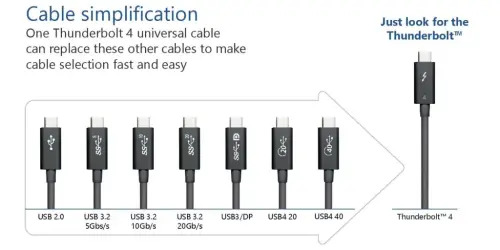
In practice it has never been smoother for me. If I come across a crappy cable that isn't up to snuff I can easily get rid of it, I already have more than I need. It's not like previously when you had to keep some rare cables in case you needed them once in a blue moon.
I'm the same way in that I just have a collection of quality cables that do pretty much everything one could reasonably ask (i.e. excluding obviously special things like "I needed an optical thunderbolt cable to deliver 40 Gbps 20 meters why isn't it delivering 90 watt PD as well!") however I can see for those that don't want to spend a lot of money (keep in mind "a lot" is extremely relative) on a bunch of cables and just want to use the cheap cables they accumulate the lack of being able to easily look at such cables and see what they are capable of without a secret decoder ring as a frustrating thing type c brought. At least with the older ones either looked like it would fit or it wouldn't or the color of the ends matched.
You made me think of my own experience and indeed I realize since usb-c how much better connecting things has been. I'm down to one micro USB device and connecting to it is so annoying. USB-c is great, and I hope Apple products switch too so there is truly a single cable type to connect everything.
Agreed. Being able to drive two 4K monitors, charge my laptop, and attach a USB hub via one USB-C connector is well worth the tradeoff of occasional incompatibility with cheap cables.
I love usb-c to death but "occasional incompatibility with cheap cables" is a bit misleading.
There is frustratingly little relation between price and quality. I have literally spent hundreds of dollars on usb-c-cables and I haven't even attempted to do displayport or thunderbolt through one, and I still don't own any that I'd expect to work on a lot of scenarios.
> They cost $30... It would be an easier advice to consumer if they were $19.
It'd be easier if it were $0 too but what does that have to do with anything? $30 is what it costs to make a cable that can do high speed data, high speed display, and high power. If you want a cable that does all of this it's going to cost more than a cable that doesn't. If you want a cable that's cheaper and doesn't do everything that is also an option. Apart from both options being available anyways this problem has nothing to do with USB standards.
> and still not support 240W
When the brand new standard actually hits the shelf you'll be able to get a TB4 240W cable, as of now there just aren't any 240W cables in general. Also not supported: USB 6 and 2 kW PD or anything else from the future instead of present.
.
Type C is an interface specification not a guarantee that you're $19 cable will be compatible everything man could desire to implement in your lifetime.
>Type C is an interface specification not a guarantee that you're $19 cable will be compatible everything man could desire to implement in your lifetime.
Except that is exactly what a lot of people think Type C will and should provide. And whether you agree with that they think or not is an entirely different question.
It's awesome being able to plop down on the couch and plug my laptop into a Nintendo Switch charger, that I also use to chargey phone. Charging a laptop before USB-C was an ordeal because I only had one specialised charger with a proprietary plug. Now I have half a dozen spread around the house and car.
Funny that you mention Nintendo Switch, because Nintendo made a non-standard implementation of usb-c there and connecting console to the standard compliant cable and charger can brick or fry the console. Perfect example of USB-Confusion :)
The rant about "proprietary chargers" for laptops was also untrue, there was uniform 19V brick-type power supply units with uniform 5.5mm barrel connector for at least 15 years.
We live in a different world. I'd like to live in yours! Prior to usb c my Hp Dell and Lenovo, all in their enterprise line favouring practicality over fashion and looks, all used wildly different chargers. Even Lenovo alone, in that 15 year span, had round and rectangle tips with 12 and 20v.
That's simply not true. I had three different laptops from 2010 to 2021: an Acer Inspiron (I think that's what it was called), a Dell Latitude, and a Surface Pro 3. All used different chargers. The Surface used Microsoft's proprietary magsafe connector, and the others used different-sized barrel jacks. I currently have a Dell XPS 13 which charges over USB-C.
Oddly, the Acer charger was the same as for an Acer 27" monitor I had, which came in handy once or twice.
In an initial flurry of enthusiasm I bought a bunch of high-quality cables and I'm very glad I did. I can keep duplicate cables around in certain pockets etc. and I know I can always connect stuff. I had always used default supplier cables and these fancy ones feel much better in daily usage.
Won't you still need rare cables in case you need them (idk, a usb-b cable for instance...), and couldn't you already throw away whatever cable you wanted and buy some more as it pleases you ? What I mean is, the previous situation also little issues if you were willing to throw money at it, as you seem to be doing now.
Even as beard shavers and display monitors have come to support USB-C, I still don't see how people can get rid of their A->C cables, or not keep around lower standard 3m long cables because thunderbolts ones aren't sold in these length, or still need a cable for their camera etc.
I switched to usb-c as much as I could. I recently travelled for a month with all my battery-powered work and personal stuff (2 MacBooks (one Intel and one M1), 2 iPhones, Nintendo Switch, game controller, mouse (that one is micro usb), headphones and shaver). I brought only the following as a trial: 1 Anker 45W GaN charger[1], 1 30cm usb-c lightning cable, 1 1m usb-c cable, 1 usb-A to C adapter, 1 usb-C to A adapter which went unused, and 1 usb-c to micro adapter.
It went better than I expected. Sometimes I used the A-C adapter to trickle charge stuff in the hotel when I was out, taking my own charger with me for the day, and other than that just rotating what I was charging. The 45W charger is not much bigger than an OG iPhone charger and had no problem with my 16” MacBook. The difference in charging time to the Apple 87W charger wasn’t noticed.
One bonus I did not anticipate. You know how some cheap devices have usb-c charging that only seems to work with a USB-A to C cable? The adapters I mentioned can work around that.
One thing want to do but not tried yet is convert a few micro-usb things to usb-c. You can get convenient little breakout boards for it on Aliexpress.
I have a similar packaging when traveling, except with two chargers instead of one (macbook’s fast charger and one for the rest of the divices). For comparison, before USB-C I needed the Macbook magsafe charger, two USB-A to lightning cables and a 4 or 5 USB-A to micro USB cables for the appliances. When the Switch arrived it shared the USB-C charger of the 16” macbook when traveling.
Basically I feel the type of cables changed but I am not traveling much lighter not has it become that easier on managing stuff. I still think USB-C is fine, better than micro USB on so many respects, I just don’t feel the revolutionary aspect yet.
Perhaps we’ll be there in 5 years? If we din’t end up with new fragmentation on the wireless charging part.
Replace throwing away with putting in box if you like. There's less need for those cables, because there are fewer devices that need them. But you gotta work on that, I also have a bunch those magnetic cables, so it's either USB-C or device with a magnetic adapter plugged into it with a cable.
this is the solution, the only problem is that it requires you to spend money (the full-featured USB-C cables are expensive) and throw things out, two things most people hate doing.
This is an incredibly thorough analysis of all the different kinds of things that can appear on the end of the USB-C. However, I think it puts blame on the hardware spec, when in reality the drivers are at fault. It is up to the driver to sort out the mess of options and provide feedback, however, engineers are not known for UX. All of the tools are there for querying caps, but this information simply doesn't propagate upstream to the GUI, so the user is left scratching their heads when they don't get bandwidth or connectivity. Recently I have started seeing devices alert me when they are plugged into a sub-optimal hub (e.g., Salae's USB-3 logic analyzer), but I think it will take some time for the driver/application space to catch up.
Plugging the cable in is the last thing you do with the cable, after buying/searching for/selecting between cables. Maybe you brought the cable with you on a trip or to the office or whatever.
If it takes you until the last step to realize you don't have a cable you can use, that's a huge spec UX failure.
Happenend to me. Bought cable, bought car power adapter for usb-c. Bought adapter to Plug USB-C into USB-A of the car adapter. Plugged everything together. Phone is not charging, for whatever reason.
That statement seems to lack consistency. You blame the spec, and then blame the designer. Which is it?
EDIT: I worked t intel, the specification is written by the architects and the implementation is created by the designers. Two distinct groups of people.
> Finally, the USB Battery Charging spec enables a weirdly missing feature: a device plugged into a battery pack had no standard USB command it could issue that simply asked, “How much current can I draw?” Instead, different manufacturers came up with solutions that were not always compatible, limiting charging among certain devices.
It's not a proper power delivery standard until this issue is dealt with.
(Note that this also applies to other unreliable power sources.) Heck, even to the main house power : you can only draw 240W so many times before you trigger the circuit breaker...
Honestly, it can also be the fault of the spec. There is such a thing as a spec being too broad or too under-constrained and allowing too much rope for implementers to hang themselves with.
I wish there was a consumer-accessible tool that I could plug a USB-C cable in and it could tell me its capabilities. (I remember in the not-so-early days when Benson Leung, a Google Chromebook engineer, would on his own time buy and test cables on amazon and rate them. Some were actually dangerous and could fry your equipment!)
Is it a "charge-only" cable that can only do USB2 speeds? How much power can it transport (if there's no id chip in the cable, perhaps this can be deduced by measuring the voltage droop when requesting various power modes over USB-PD)? Can it carry DisplayPort-over-Alternate Mode? -over-Thunderbolt? etc.
Last I checked, 6 months ago, it seemed there was only lab-scale equipment that could do this.
I dealt with USB-C hell when I was setting up my new office. BYO (choose your own) laptops meant that the USB-C ports on each employee's laptop had different capabilities (alt mode for DP 2-lanes? 4-lanes? HDMI? etc...) and the same for monitors and docks.
I got about half way through designing this device (PCBs went out, firmware never written), intending it mostly for identifying sources and sinks before I had largely solved the office's problems and my needs faded.
If there's collective interest, I could get back at it to finish the job.
There are already type-c testers that can monitor and dump the PD communication, so you can look at PDOs and Alt-DP VDOs to see what each side supports and what is negotiated. No need to re-invent the wheel.
As (according to the article) all of these cables carry little chips broadcasting the standards they support – couldn't this be just some little software app which just reads out that cable info?
The article is actually wrong on that point: many USB-C cables do not have any chip, only the ones which have extra capabilities (like being able to carry 5A of current instead of only 3A) need to have a chip.
I think you misread the article. It consistent refers to the connector on the cables as "cable end", and the places you plug these cable ends into as "ports". It says that the ports are the ones that broadcast the capabilities.
Tangentially, I've had great mileage out of the Satechi USB-C power-meter [1], which has demonstrated how cheap Amazon usb-c cables really don't carry as much power as Apple's expensive ones
Similarly I like my Witrn Qway U2 which does power meter but also gives you the ability to check which fast charge protocols are supported, and for USB-PD and QC3.0, the supported voltages and watts. You can even trigger them manually though I've broken some devices with this before.
This seems like the place to ask, what is up with USBC displayport alt mode during boot/bios?
Like I'm traveling with a usbc only monitor connected to a 6800xt and everything has been working fine with it until yesterday.
I updated manjaro packages and the kernel to 5.15, and somehow that resulted in the monitor not working during boot anymore. Which I just don't understand the logistics of AT ALL. How does the host OS relate to video out during boot?
The video out also didn't work once booted into linux but I was able to resolve this by replugging the monitor a couple of times after each restart. Ultimately reverting back to the 5.14 kernel fixed it in Linux but didn't fix it during boot.
So now I just have to enter my LUKS pass blindly and hope for the best or that I never need to adjust my bios settings ever again.
And on a slightly related side tangent how do people who switch to a bluetooth mouse/keyboard adjust their boot/bios? They just don't?
One nice thing about Apple computers is that Bluetooth works before the OS is booted.
I’ve heard some motherboards with built in wifi can enter the bios using a long power button press or something, and pair from inside the bios. Some Bluetooth adapters can stay paired after a soft reboot too. Both of above I only know about from seeing people complain online that these features don’t work.
There are some usb Bluetooth adapters that let you pair directly from the adapter to a keyboard, no OS required once it’s set up. Some keyboards have an optional usb cable you can use. You can also use a keyboard with a proprietary usb wireless adapter, that is a normal
usb HID device. All Logitech keyboards come with this even if they support bluetooth, probably because tech support is a nightmare otherwise. Amusingly, Logitech Bluetooth devices sold for macs are the same products but simply leave out this adapter.
Come to think of it, I use normal bluetooth devices with a windows desktop and at least once a month I need to connect a usb mouse to turn Bluetooth back on (it’s easy to turn off by mistake) or because things just stop working.
You have to rustle up a wired keyboard, at least. Fortunately, most hotels and motels will have them handy in their computer rooms, and almost any business will have a keyboard for you to try borrowing.
I've been carrying my full sized wired keyboard along with my laptop since I had a laptop keyboard fail a few devices ago. I'd rather have a portable pc and monitor in a clunky case, the form factor of a laptop has always seemed the wrong solution for the problem being solved. Multiple pieces isn't a big deal.
> how do people who switch to a bluetooth mouse/keyboard adjust their boot/bios?
Most wireless mouse/keyboard use the same USB HID drivers as the wired equivalents. So they work just fine in the BIOS/EFI. At least that’s been the case for every device I’ve used; I’m sure there are exceptions.
That aside, fuck Bluetooth keyboards/mice. Even if you don’t play games, Bluetooth latency is very noticeable. I much prefer logitech lightspeed mice.
Ahh I hadn’t even considered using the built in Bluetooth since pairing random devices is so hit and miss. It’s one of those things that always breaks at the worst possible moment.
I think USB-C solved some problems (no need to keep numerous different cables) but created another one - everything is now USB-C, and you can easily fry your things. My case: I lost the charger for T480 and purchased another one, not original from Lenovo, but something cheaper. I thought: the same specs, why should I pay 2-3x more. After two charges and a third attempted one, white smoke and smell of burned component. Motherboard replacement cost me almost 10x more of that original Lenovo charger.
After this, I don't touch third-party USB-C cables unless they charge something I don't care about.
Why is that a "usb c problem" as opposed to "cheap 3rd party charger problem"?
I buy a lot of 3rd party chargers myself, but frying electronics with a bad cheap charger has existed long before usb c.
(my personal life now with usb c is better... I buy a couple of quality chargers and cables and I'm good for everything. My Lenovo adapter can charge my phone in a pinch that's amazing! :)
Because of the purported interoperability explicitly implied by the U in USB, and what people have come to expect that stands for, AND the fact that the specs spell out charging protocols, voltage restrictions/limiting, etc, backwards and upside down. It's a bit like a sort of "good" inverse of DRM: that specific charger's failure doesn't fall into a grey area, it squarely calls it out as bad, because "you get a certification" is gated on a manufacturer's word that they've implemented the spec, and correctly. (DRM, by comparison, implements a "thou shall not pass" that is sufficiently complex that passage incontrovertibly equates to breakage. Here, the "thou shall pass" is tied to some complexity that the manufacturer clearly promised they implemented, but didn't.)
I expect the GP could reasonably report where they got the charger to the USB-IF, and theoretically cause the manufacturer in question to receive a bit of heat for what occurred. Practically speaking the state of things suggests that the USB-IF is probably dealing with enough of a firehose of such reports it probably takes sufficiently long for action to be taken that manufacturers practically get away with this sort of thing :'(
Obviously if the charger was purchased from somewhere like Amazon it'd probably never get taken down without reasonable expense (purchasing additional units to prove danger) and media fanfare. Hahah.
How is "purported interoperability" important here though? There were big news warning of highly proprietary cheap Apple chargers frying MacBooks as well. You're trying to blame USB-C for a problem that's completely orthogonal to it.
Connectors are the same, so what? A cheap and poor micro usb, or apple magsafe, or household 110v or whatever cable, can fry your stuff. Regardless of connector or standard or shape or size you can buy a quality product or a crap product. Usb c is not a sign of quality. It's a standard. I think to siblings point, you can buy an apple fake charger that can fry your Macbook. That's not apples fault or standard fault or universal design fault. That's a crappy no name cheap part fault.
Don't get me wrong. I used to buy 50cent Dollarama cables too. Then I followed some of the links fellow hacker news folks posted and now I don't - whether usb c or whatever else. Seeing an oscilloscope or whatever graph of quality vs shoddy charger is illuminating and terrifying.
But then again, you can now buy one (or more) "expensive" brand-name USB-C cables that will pretty much work with everything. The expensive Lenovo charger and cable will probably not fry the cheap junk you may have lying around. And it's still a win, you don't have to carry / find that one particular cable.
Just yesterday, I was telling myself I had been a fool to spend more money on yet more cable-ware, when I am surrounded by cables I don't need.
But now I feel a lot better, thanks.
Charging cables are set up in a couple of places in the house, aren't used for data. My dealer for charging cables is Rolling Square. They are nicely built and have complicated adapters on the ends that can handle all the USB-PD stuff, up to 100 Watts:
Yes, the TB4 cables are more expensive than the ones intended for just charging. And the charging cables are designed to provide power to a range of USB devices, most of which were designed before USB-C Power Delivery was a thing.
The charging cables have adapters on each end that can do USB-C Power Delivery, micro-USB with (I believe) "fast" charging per the Qualcomm or Samsung specs, or Apple Lightning.
But yes, they don't have the re-timers necessary for 40 Gbit data.
The Thunderbolt 4 cables cost about $50 right now (2 meters), about twice the price as the universal charging cables.
All of these cables have E-Marker controllers at each end to negotiate all of these modes. I was able to find the data sheet for a common charger controller, made by Cirrus Semiconductor. It's a little ARM Cortex M0 computer.
So a wired local area network of computers talk amongst themselves to figure out how to push energy and data around.
Rolling Square was pricing their stuff at deep discount for Black Friday, a good value. Kickstarter products, they've been around for at least five years but might be clearing inventory before the new year.
OWC, I think I was buying SCSI terminators from them back when the rubble of the Berlin Wall was still on the ground...
One last thing FWIW --
For my travel bag, Rolling Square has a super short version that can fit in your pocket. One of those, a Thunderbolt cable, and a quality USB-PD charger can handle just about any situation.
I also bought a new desktop PC last week and already misplaced the manual. It seems it has several USB-C type plugs, but they are also not all the same. How will I ever be able to remember which is which?
Lab grade devices (like products from totalphase) that can do that properly are usually very expensive (like $20k). But there are some cheap boards around that might work (no guarantee):
Maybe I’m lucky, but I have only ever had 1 problem with USB C, and it was a really minor case[0]. I just keep getting anker cables when I need them, and it always works. I keep reading about these spec issues, but I haven’t had any issues myself (aside from the one I listed).
0 - My double wide qi charger has a USB C socket, but came with a USB A brick and an A to C cable. That works fine, but when I plug it into my kitchen receptacle with built in USB C, it doesn’t work. I ended up moving that to another room for unrelated reasons, so not a big deal either way.
>USB 4 basically implements Thunderbolt 3 inside the USB spec, making it a requirement for all USB 4 controllers
That is not true. The support of Thunderbolt 3 is optional under USB4 spec. Along with a few other nitpick that is not entirely accurate. But it gets the point across
And its time to tell the unpopular story again. ( Because USB-C Supporters hate it )
Trying to help a lawyer out and trying to explain why the $5.00 USB-C cable he'd bought from Amazon wasn't delivering 4K video to his expensive monitor AND powering his laptop too.
Me: OK: so its a USB-C cable, but its not a high data rate USB-C cable.
Him: But, its a USB-C Cable.
Me: but, no, not all USB-C cables are high speed cables. And some of them can't do high speed and power delivery
Him: but... its a USB-C cable: it plugs into the port.
Me: Um... just because it plugs in, doesn't mean its going to work. You can have USB-C cables that are actually slower than the old USB ports.
Him: but.... shouldn't it just work?
And so on. For... 15? more minutes? maybe 30? I finally got him to buy a "proper" belkin USB-C cable .
This basically sums up everything that is wrong with Tech thinking vs User Thinking.
Author of the article here—please do tell me more about the Thunderbolt 3 and USB 4 relationship. I used “basically” to hand wave over some of the detail, but would love to know how to dig down on this further. (And I welcome nit picks. Seriously! We just did a couple tweaks. Some folks who buy HDDs said they see 3.0 Micro-B all the time, and that is absolutely true, so we modified a sentence about that.)
I'm leaning a bit on three things:
• The USB-IF says that USB 4 is based on Thunderbolt 3 and incorporates Thunderbolt 3. If it's optional, they buried it in the spec? Would love to know where if you do so I can make that clearer. (See https://www.usb.org/usb4 for instance.)
• Apple’s USB 4/Thunderbolt 4 controller ostensibly incorporates all previous standards with backwards compatibility, so the question will likely arise in a specific case: a Thunderbolt 3 device with a Thunderbolt 3 controller attached to a USB 4 controller that isn’t a Thunderbolt 4 controller. In that case, the host computer’s USB 4 controller would have to negotiate down to 10 Gbps and USB 3.1 Gen 2? (???)
• In practice, I wonder which controller modules major brands besides Apple will adopt: it seems most likely they would want USB4/TB4 not USB 4-only?
Per the above about the lawyer, too, the USB-C Charging Cable Apple offers (no video, 480 Mbps USB 2.0 data, and up to 100W power) is absolutely the most maddening cable on the market.
This will need some time to dig into spec to give you the definite answer ( As it was in Spec 1.0 and I dont think they have changed it since ) But if you trust wiki as a reliable source on it [1] under Thunderbolt 3 compatibility
>The USB4 specification states that a design goal is to "Retain compatibility with existing ecosystem of USB and Thunderbolt products." Compatibility with Thunderbolt 3 is required for USB4 hubs; it's optional for USB4 hosts and USB4 peripheral devices.[15] Compatible products need to implement 40 Gbit/s mode, at least 15 W of supplied power, and the different clock; implementers need to sign the license agreement and register a Vendor ID with Intel.[16]
i.e It is part of the USB4 spec, but it is not mandatory.
First thing is that we or at least I haven't found an answer from Intel on the cost of testing and licensing on Thunderbolt. ( So before anyone claiming Intel is greedy, some work has to be done to ensure QA, and work needs money, even if it is just registering an ID. ) Being Royalty free doesn't mean everything else is free. But let's assume it really is free.
Now in my pure logical guess and observation from the current market is that all USB4 host controller right now have at least Thunderbolt 3 compatibility because getting rid of it doesn't save much cost than provider another SKUs. And so far it seems all announced USB4 controller are also TB4 controller for the same reason. As TB4 isn't that much different to TB3.
>In practice, I wonder which controller modules major brands besides Apple will adopt: it seems most likely they would want USB4/TB4 not USB 4-only?
Yes, but that is assuming they cost the same and they dont start doing market differentiation / segmentation. Whether there is an market for cheaper USB4 controller remains to be seen. For example. You could have USB 4 host controller that only support USB4 20 Gbit/s Transport ( not the same as USB 3.2 (20 Gbit/s) ) and not support any Thunderbolt compatibility. Even if that is only a cost saving of possibly pennies I dont think we should underestimate the power of greed. And in fairness if you do millions of unit penny counting is important.
I hope, in pure good faith, that wont happen because it is easier to market existing USB 3 20Gbps and have all USB4 supporting both TB3 and TB4. But again this is not required by spec. And all it takes is a bad actor in the market to do it.
And in all fairness I dont think USB4 Host / or USB - Type C Host were the issue. I do think the consumer should know what the port they buy have support for. But USB-C cable is simply is a bag of hurt.
I found it in the spec in section 2.1.5. (Referring to the May 19, 2021, clean revision of USB4 1.0.)
"A USB4 host or USB4 peripheral device can optionally support interoperability with Thunderbolt 3 (TBT3) products.
"A USB4 hub is required to support interoperability with Thunderbolt 3 products on all of its DFP . A USB4-Based Dock is required to support interoperability with Thunderbolt 3 products on its UFP in addition to all of its DFP.
"When interoperating with a TBT3 product, Thunderbolt Alt Mode is established on the link between products. The USB Type-C Specification describes how a USB4 product negotiates and enters Thunderbolt Alt Mode."
So, accurate!
However, my question is about major brands. Will Lenovo, Dell, etc., go for USB 4-only instead of USB 4/TB 4? I guess we'll find out.
But my understanding would be that a Thunderbolt 4 controller connected by a USB 4 cable to a USB 4-only device running USB 4 for 20 Gbps would still work through Thunderbolt 4’s backwards compatibility across all USB modes.
I don't see that as a problem that can be solved. It's not like it's a new issue. The most direct equivalent is Ethernet cables. If you don't have the right category of cable for the speed and distance you're running, it's likely not going to work. Or it will work, but it will be slow due to packets constantly being retransmitted. Power cabling has a similar and more dangerous issue. Don't buy a cord with the correct wire gauge for your load and the length of the cord? That's a fire hazard.
Some of this wrong, some of this is way too wordy.
>
USB-C cables that support Power Delivery 2.0 and 3.0 can carry a minimum of 7.5 watts (1.5 amps at 5 volts) or 15W (3A at 5V), depending on the device, cable, and purpose.
Nope, all USB C cables are 60W minimum. The connector might support less, but the cables do support 60W minimum.
> USB-C Charge Cable—designed in the early days of USB-C
Nope, nothing wrong with a USB C cable which doesn't have the high speed lanes connected. That's a perfectly specification conformant cable. High speed lanes is the phrase I miss from this too long article.
Here's a much shorter explanation of it all.
A USB C cable always have separate wires for 1) power , either 60W or 100W capable. The latter needs an eMarker IC in the connector 2) a separate pair for 0.48Mbit/s speed USB data (aka USB 2.0) 3) it can have and most do have four high speed lanes (each lane is formed from two wires as differential pairs). These lanes can carry various data , by default it will use two lanes to carry USB data -- at at least 5gbps, if the cable is short enough then 10gbps. (While 20gbps mode over four lanes is defined so few hosts support this we don't need to care.) There are alternative modes besides USB, namely DisplayPort and Thunderbolt. In DisplayPort alternate mode it can use 2 or 4 lanes for DisplayPort. If two then the other two can be used for USB data as above. DisplayPort has its own versions: DisplayPort 1.2 can deliver 8.64 Gbit/s video data over two lanes, while 1.3/1.4 can carry 12.96 Gbit/s and for both double that over four lanes. (DisplayPort 1.4 introduces compression as well which needs to be supported by the monitor and it's very rare to do so.) This is aggregate video bandwidth for PCs: they can drive multiple monitors using a DisplayPort technology called MST. For Mac, you need Thunderbolt.
Thunderbolt. Unlike the previous ones where the cable is functioning the same as a pre-USB C cable and a simple (basically, passive converter) can dole out USB and DisplayPort data this one is a complex bus and both ends needs to have a Thunderbolt controller. The Thunderbolt 3 bus can carry PCI Express and DisplayPort data (USB is provided by the controller presenting a hot plug root hub, due to hot plug nature there's a bevy of problems), the Thunderbolt 4 bus can carry PCI Express and DisplayPort and USB data. (Footnote: Thunderbolt 4 is the same as USB 4 with some optional features made mandatory. It is somewhat unlikely we will see non-TB4 USB 4 controllers so this is mostly just pedantry -- you can treat USB 4 and TB4 as being the same.) The bus bandwidth in one direction depending on cable length can be 20gbps or 40gbps. When allocating this bandwidth, DisplayPort has priority. How much DisplayPort is on the bus in total is a bit confusing due to some history: laptops with one Thunderbolt port most often will only put one DisplayPort 1.2 connection on the bus. Laptops with two ports always have full Thunderbolt and will put two DisplayPort connection on the bus (very rarely, single port laptops will do this too, mostly early workstations). This confusion goes away in Thunderbolt 4, that's always full. But the bus is never faster than 40gbps so even if it is fed by two DP 1.3/1.4 connections, it still can't deliver more than 40gbps data where two independent DisplayPort cables would be able to deliver slightly more than 50gpbs.
Finally, power. If only 5V is required, resistors are used to signal how much power is requested. For 9/15/20V power is negotiated: the devices figure out which one is source and which one is sink, once that's done, the source will communicate how much power it is able to provide. At most 3A can be used normally, at 20V provided the right cable is present, 5A is also a possibility. There is a separate wire for this communication. Using the same communication process, the data roles are decided: one of them will be upstream (think host) one of them will be downstream (think peripheral). There's a sensible default where the upstream data role takes on the source power role but this can be changed using this negotiation.
Footnote: these were fixed power. Today some devices support the PPS (Programmable Power Supplies) feature which allows the sink to rapidly change the wattage as needed. This also requires eMarker cables.
My eyes glazed over looking through your comment. I think you and the author of the article are in agreement as far as this part of the article is concerned: “What we want is to look at a port and cable and know what they do. That shouldn’t be so hard, but it apparently is.”
I believe, as I wrote elsewhere in the past the solution would've been standardized introspection: cheap devices you can plug into a port / a cable into and it gives capabilities.
USB-C cables are not all capable of carrying 60 Watts. They're supposed to, but there's no way to know that the cable you are holding, or looking at buying, is actually capable of that.
Back in 2016, Benson Leung tested many USB-C devices and cables. I went through his amazon profile [1] and found an example of an out-of-spec cable he tested[2].
> Furthermore, the DC Resistance of this cable is too high:
> VBUS 140.82 mΩ
> GND 90.09 mΩ
> The IR drop on GND is too high. At 3A, the maximum allowed resistance is 83.3 mΩ, and this cable exceeds that. Furthermore, the seller also advertised that this cable was "100W" capable, meaning that the maximum is actually at 5A, with a maximum resistance of 50.0 mΩ. In both cases, this cable has too high IR drop.
I just read through the USB-C spec, and the closest thing it says to 20V/3A minimum is in a chart that has a footnote:
"the USB Type-C specification requires that a Source port that supports USB BC 1.2 be at a minimum capable of supplying 1.5 A and advertise USB Type-C Current @ 1.5 A in addition to supporting the USB BC 1.2 power provider termination."
Is there a more explicitly states a minimum of 20V/3A? I may be misreading the table above this (Table 2-1).
Nope, finally found it in the USB-C spec, section 4.6.2, covering cables: "USB Power Delivery in Standard Power Range (SPR) operation is intended to work over un- modified USB Type-C to USB Type-C cables, therefore any USB Type-C cable assembly that incorporates electrical components or electronics shall ensure that it tolerate, or be protected from, a VBUS voltage of 21 V."
This comes after a table that would seem to indicate USB-C as a whole supports a minimum of 7.5W, but then this cable-specific section expands that. However, it notes that it must tolerate or be protected from, which in this context I gather means "must pass power through."
I am not sure if 60W minimum is a PD requirement or USB 3.0 requirement. But I am 100% sure there are USB C Cable that only do USB 2.0 and doesn't do 60W charging.
I would love to find the citation outside of Wikipedia for the USB-C 60W requirement. Apple makes a USB-C charging cable that only does USB 2.0 but is capable of up to 100W. And you can find cables like this Belkin one that promise 15W: https://www.belkin.com/my/chargers/wall/usb-c-home-charger-u... But perhaps it’s out of spec?
Your last point there, if someone wants a real example, the DJI drone remote controls are a peripheral that provides power to a phone, when you connect your phone to it, the phone starts charging and launches the app.
2. USB2 speed data wire pair supporting 0.48Mbit/s
3. 2/4 high speed data wire pairs (“high speed lanes”), normally 4
Each high speed lane supports at least 5/10Gbit/s depending on cable length.
4. Separate wire for negotiating power supply and data host and peripheral
5. eMarker cables are required for rapidly changing wattage of power supply (Programmable Power Supplies, PPS)
Note that two DisplayPort cables (not USB-C) could support 50gbps, more than a USB-C maximum of 40gbps.
B. Protocols (all over high speed lanes apart from USB2):
1. USB2
2. USB3 (by default using two high speed lanes at 10gbps, four high speed lanes at 20gbps theoretically possible but rarely supported by hosts)
USB requires negotiation of host and peripheral (upstream and downstream).
3. DisplayPort 1.2 (8.64Gbit/s video data over 2 high speed lanes) / DisplayPort 1.3/1.4 (12.96Gbit/s over 2 high speed lanes, double over 4). MST technology allows splitting the aggregate video data bandwidth across monitors. DisplayPort 1.4 supports video compression, but this is rarely supported by monitors. If using only 2 high speed lanes the other 2 can be used for USB data.
4. ThunderBolt 3/4 (needed for Mac video). ThunderBolt 4 is USB4 with optional features mandatory, however in practise these optional features are likely to always be included so they can be treated as the same.
C. Device support:
1. Power: 5/9/15/20V. Requirements signalled by resistors on the device side if only 5V. More than 5V negotiated between devices: 1. Agree source and sink, by default the data upstream/host is source but this can be negotiated, 2. Source indicates how much power it can provide, either 3A or with a 20V cable optionally 5V. This assumes fixed power, some devices now support PPS.
2. Data bus types: 1. passive (supports USB and DisplayPort) / 2. ThunderBolt 3 (PCI Express and DisplayPort, USB as hot-plug root hub(?)) / 3. ThunderBolt 4 (PCI Express, DisplayPort, USB)
ThunderBolt controllers needed on both sides to support ThunderBolt.
3. Bus bandwidth is maximum 40gbps. If cable is long bandwidth may only be 20gbps. Laptops with one ThunderBolt port typically support DisplayPort 1.2 bandwidth on the bus, laptops with two ThunderBolt ports support two DisplayPort 1.2 bandwidth. (There is some distinction between “full” and “non-full” ThunderBolt that goes away in ThunderBolt4.)
B. I do not use USB protocol numbers for they are confusing. I use USB data speed. 480mbps is over the USB 2.0 wires, 5/10/rarely 20 is over the high speed lanes. The only negotiation USB requires is the decision of who becomes upstream (host) and who the downstream (device).
> Laptops with one ThunderBolt port typically support DisplayPort 1.2 bandwidth on the bus, laptops with two ThunderBolt ports support two DisplayPort 1.2 bandwidth.
Or two DisplayPort 1.4 bandwidth, depending on the TB3 controller.
Data hub is passive in the sense of not containing any protocol converters. It still needs a USB C controller to negotiate DisplayPort alt mode.
My understanding is that when you connect two devices together, they negotiate power (and data rate?), so the device supplying power won't supply a voltage that is too high for the consuming device and the consuming device won't try to draw too much current from the supplying device.
Question: does the cable also tell the devices what it is capable of, so that if the devices are capable of 20 V and 5 A but the cable can only handle 5 V and 3 A that is all that the devices will actually do? Or will the devices happily go ahead and do 20 V and 5 A and set your cable on fire?
The big issue is thunderbolt. Sometimes you'll have to explain to people that the external display can only be connected by this USB port using this cable and not that USB port using that cable.
And yet USB does 'too little' overloading of the USB-C port:
> Full-featured USB-C cables that implement USB 3.1 Gen 2 can handle up to 10 Gbit/s data rate at full duplex. They are marked with a SuperSpeed+ (SuperSpeed 10 Gbit/s) logo. There are also cables which can carry only USB 2.0 with up to 480 Mbit/s data rate. There are USB-IF certification programs available for USB-C products and end users are recommended to use USB-IF certified cables.[12]
There was a minor scandal a couple years ago where Nintendo's Switch console didn't implement the standard properly, and as a result some third-party docks were sending too much voltage and frying people's consoles
It was actually the docks that were the problem, not the switch. The switch just has a standard USB-C PD controller in it, the docs had hacked together bs.
Also, the official dock only supports 15V PD apparently, which most laptop chargers apparently don't supply, so that's why you pretty much need to use their charge cable with it.
The 100W cables have E-Marker chips that will actively tell both the source and the sink that it can take that power, so burning up shouldn't be a problem, assuming everything is within spec.
>does the cable also tell the devices what it is capable of, so that if the devices are capable of 20 V and 5 A but the cable can only handle 5 V and 3 A that is all that the devices will actually do?
yes, assuming the cables properly implement the spec
Cool. The next question then is that if devices can tell other devices what they are capable of, and the cables can tell devices what they are capable of, could one build a portable, consumer priced, tester that (1) you can plug into a USB-C port and the tester would tell you what that port supports, and (2) you can plug a cable into the tester and it tells you what the cable supports?
In my opinion it is probably something used as a cost-saving trick. Maybe some connectors/sockets/boards just happened to be cheaper that way at the moment. If the manufacturer do not care about being standard-compliant, you get something like that in the process. I mainly (only?) see such things in a more or less cheaply made “no-name” chinese-imported electronics.
Yeah, that is one explanation. But the magewell products are expensive and there have good linux support (only reason why I picked them), which is usually not found in cheap chinese products (even if I know magewell is chinese). I thought a bit more about it, and it seems they have have carefully selected an A type connector, in the documentation, they state we should not use an other cable. Maybe they have some electronic in their cable and used the A-A trick to prevent users from using another cable. I could take the cable to the electronic lab to have it tested, but sadly I don't have spare lying around and the devices are all in use.
A small anecdote (side note- I seem to be turning into the old guy yells at cloud meme), though I'm a tech guy at heart it had been many years since I'd needed to know anything about USB's tech capabilities. Just over 15 years ago I was bit-banging over USB with an AVR device to retrofit some legacy DB-25 hardware / software into Windows / USB. So I figured I learned enough about USB to last a lifetime. Boy oh boy.
Since then though I got lazy, fell behind in my knowledge, and was comfortable just being able to plug stuff in to charge / transfer data / whatever. It seemed like a solved problem so I went about my work without considering the ins and outs of a simple cable. I mean, it's just USB right? Different connectors, some carry more current, faster speeds over time etc, what more to know?
Then mainly during early Covid when I was often switching between working from home vs in offices, I got sick of how many cables I needed to plug and unplug each morning and when I got home.
I was inspired to solve this problem after one office I worked at had a USB-C dock that magically supported 2 displays, ethernet, etc. So I thought brilliant! I'd get one of those...
Only they don't seem to exist / be in stock anywhere anymore, at least not without a long shipping delay from overseas. So after talking with a sales assistant at the local office supplies warehouse I grabbed something similar (and expensive for what essentially amounts to a fancy USB hub) off the shelf that had video support, and was saddened when it didn't work. That's when I read the instructions that were packaged with the device and apparently it only supported the USB-C with the little lightning bolt icon. Cue hours of reading and research to get up to speed on what all the different little icons I'd never noticed in the injection-moulded plastic meant.
Okay my bad, I should have spent more time keeping up with technology and less time watching netflix.
At least the dock worked for everything else, it wasn't ideal but I could deal with just 2 cables to swap out.
But why then did the dock at the office work?
I grabbed the model number and did some more research and lo and behold it has a built-in graphics adapter. So rather than outputting frames from my still quite capable GTX1070, some cruddy generic display chip was doing all the work through USB and some proprietary display drivers. I tried a couple of games as a benchmark and yep, FPS was woeful. That wouldn't do for my home office at all, so I nixed any hope of getting true video out via USB-C from this device.
All told it was probably less than a day of actual time spent, and a hundred dollars so no big deal for me. But this experience led me to seriously consider that if someone like me with a strong interest and experience in tech gets sent for a spin by something that should be simple and "universal", I don't really understand how the average consumer is supposed to navigate it all. Sure, it's simple once you know, but it is niche knowledge, most people want to learn things about people, their jobs, stuff directly relevant to them and not memorize a grid of cable standards. So I'd wager most people don't read too deeply into it and either a cable/device "works" or is "broken / shit."
Thinking of all the time wasted and frustration people must have swapping devices and cables, the sense that finding a magical combo that works creates a cargo-cult type mindset around brands and devices, as if it's all witchcraft voodoo. I wonder how many perfectly good cables and devices get returned or trashed each day because people think they're "broken."
Anyway old guy has finished yelling at cloud for the day.
I wish we could just standardize on (say) 12 volts, with some barrel connector size that is currently unused. All cables that have the barrel must carry at least 250W. Current negotiation works like this:
All power supplies must tolerate over current by optionally voltage drooping to 5V for 100ms, then (mandatory) tripping a breaker if overcurrent persists. Devices can binary search on the current draw, or not (so long as they actually trip the breaker and don’t just cycle on and off at 10hz).
Plus on inside minus on outside for barrel connector.
Done. Forever. The complete spec could fit on a page.
so all cables and connectors rated for a bit over 20amps (i.e. more than your usual domestic socket, for reference what cable sizes that is), DC, with disconnection under load? That is highly impractical.
The other annoying thing is that even if you get the right charger and right cables, you might only get power delivery for certain devices.
E.g. a charger + cable combo that works fine with phones and Chromebooks, but plugin a Dell laptop and nothing happens.
Same with older Mac chargers - they'd not do anything when I plug my phone in even if they charged laptops ok (or at least this was the case a few years back)
The following week: sellers on AliExpress are printing the max data speed + wattage on cables. (Not the max that this cable supports, necessarily, but the max they researched to exist.)
You’re very optimistic to think that they’d allow reality to limit them :) The first time I was buying 18650 batteries I naievely went for the largest advertised capacity, and got some whose claims broke the laws of physics… (And of course, in reality, the capacity didn’t even meet my minimum requirements)
Well, literally every single person I've spoken to about it calls it either "thunderbolt" or "USB-C", or else they're boomers and call it "the round one".
Not a single person I've encountered in real life calls it "type c".