I've tried to learn FreeCAD on a few occasions, but I just don't get it. I guess I'm spoiled with OpenSCAD, which actually makes sense to my programmer brain.
FreeCAD generally feels more like a traditional CAD program to me. I'd use OpenSCAD, but can't for my application: OpenSCAD fundamentally uses imprecise shape approximations. You draw a sphere but get a high-poly ball, sorta like raster vs vector in 2D imagery. This is fine for a lot of applications, but I want to CNC large, smooth undulating surfaces. The best way to get into my CNC (Shopbot PRS alpha) is via Fusion 360, and Fusion 360 barfs tremendously quickly with those high-poly shapes unless you get the actual (mathematical, "vector") shapes in with a format like IGES or STEP.
OpenSCAD is _awesome_ for targeting 3D printers, though.
OpenSCAD will barf quickly on high poly shapes too. Try asking it to render a 1000x1000 point surface some time. That's not even a particularly crazy level of detail if your 3D printer is reasonably large.
I find FreeCAD and OpenSCAD to be good for different things but definitely prefer FreeCAD overall.
How did you try to learn FreeCAD? It took me quite a few tries to get the hang of it, but it is super powerful once it starts to click.
The "Part Design" workflow is best, in my opinion. Set workbench to "Part Design", create a "body", create a "sketch" on one of the xy,xz,yz planes, and then draw rectangles, circles, line segments, arcs, b-splines, etc. in the sketch. Constrain it using the constrains, pad it into a solid shape of a given width, then click on a surface on the solid and create a sketch on that surface, again draw the sketch and constrain it, and then you can either create a pad out of that surface, or a pocket into it, and so on. Once you're done, select some edges that you want to tidy up and either fillet or chamfer them, and the part is done.
You can also add or remove material by creating another sketch on one of the base planes and adding a new pad or pocket, or by revolving a sketch around a construction line. You can create "datum planes" in space to allow you to create sketches on planes that don't actually exist as either base planes or surfaces in the part. And you can add a linear pattern to duplicate a feature in a straight line, or a polar pattern to duplicate it in a circle, or a multitransform pattern to combine several of these. The Part Design workbench is really powerful.
There are some good tutorials on YouTube, but make sure you're watching "Part Design" tutorials. The older "Part" workflow is almost useless in comparison, it's basically the same as what you can do in OpenSCAD except without the programmability.
The worst part about FreeCAD is that sometimes if you ask it to do a complex operation (e.g. a fillet on some weird geometry), rather than just saying it can't work out how to do it, it segfaults.
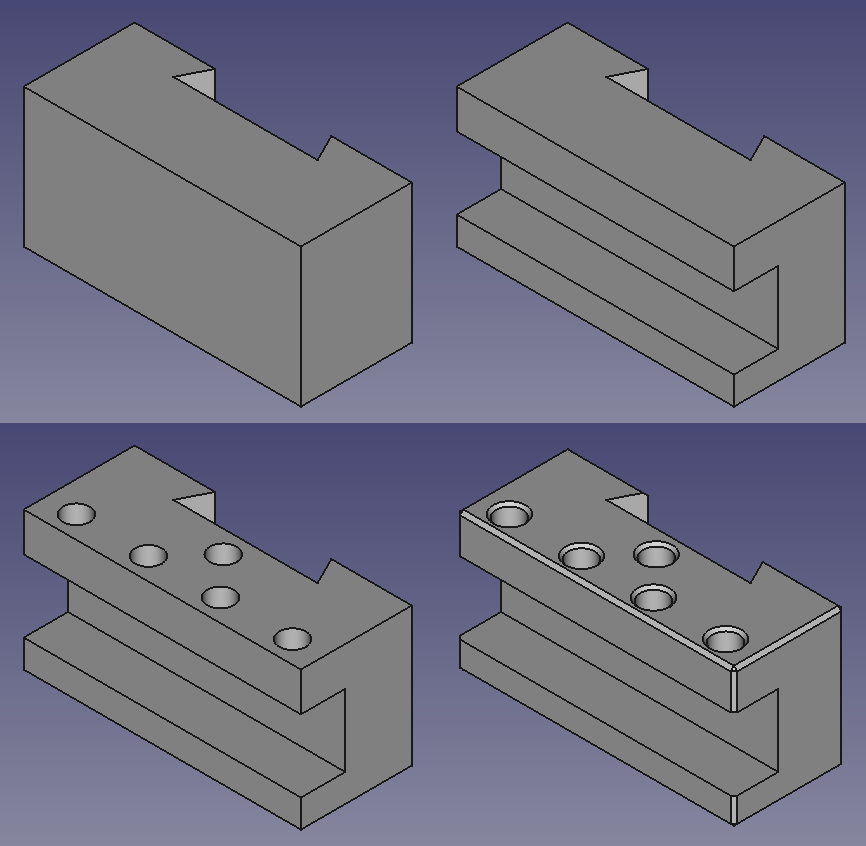
This GIF shows a simple part I recently made in FreeCAD: https://incoherency.co.uk/blog/cad-dojo/img/lathe-tool-holde... - It starts out with a sketch that is basically a rectangle with a dovetail cross-section cut out of it, padded up into a solid. Then a new sketch is created on one end with which to cut out the rectangular slot, and then a sketch is created on top to cut out holes to the required depth, and then some of the edges are chamfered.
The big annoyance with FreeCAD for me is the lack of true parametric design.
In Fusion360, you can create global variables/parameters, calculate new values from them, and reuse them across parts. I haven't found any equivalent "central configuration" ability in FreeCAD, which is pretty important to my workflow.
You can create a "spreadsheet" with named cells and refer to those names in your constraints.
For example you could create a cell called "cylinderbore" and have either a static value in it, or a value computed from something else, and you could set a radius constraint to "cylinderbore/2", or "cylinderbore/2 + 0.3" or whatever you want.
(Contrary to what the video implies, you don't have to manually click on each constraint whenever you change your spreadsheet, the global recalculate button will do it.)
Since FreeCAD 0.17 one can do this with "Expressions". Click the Formula button in entry objects and you can make a formula that contains references like "someotherobject.propertyname".
For the central driving paramterss I recommend using a spreadsheet, as others have mentioned. I usually call that "inputs". And then have another one called "outputs" if I need to calculate something based on geometry, like total material/weights etc.
Hm. I'm not sure I follow and I use Fusion regularly and FreeCAD a little. Does the property editor/spreadsheet in FreeCAD not count? You change a value, the dependencies get recomputed. Works about the same as in Fusion and certainly satisfies "parametric" for me.
(I use Fusion too, and think it's overall easier to use and more polished, it just seems strange that the lack of parametricity is what irks you.)
I'm also primarily attached to OpenSCAD, especially for creating 3D printed designs, but I've found a nice compliment in using it side by side with FreeCAD for generating STEP files for CNC and really nice technical drawings.
FreeCAD has an OpenSCAD module and it makes for a really simple workflow of exporting your .csg files and importing them to FreeCAD. Both applications are scriptable, too, so with a little bit of bash and python you can automatically generate updated STLs and STEPs as you code in SCAD.
Being able to run both on an RPI4 maybe with curaengine would make a powerful little shop PC.
To be fair, FreeCAD can be really hard to "get". It's a Big Tent serving a lot of markets, but without the billions of dollars that drive the commercial CAD market behind it. The modelling feels "off" if you're coming from commercial packages, the UI can be really hit and miss, and there's nowhere near the level of network effects when it comes to actually learning it as you would get with a commercial package.
This guy (https://www.youtube.com/channel/UC_9HwDkwxllq5lFGkYBIH9g) also had great tutorials in english (and also a german channel) but sadly he died in an car accident and did not get the chance to use / make tutorials for the new part design workflow :(