OP is specifically talking about the ability to use arbitrary images as cursors. Why aren't the standard i-beam, crosshair, resize etc cursors enough for your purposes?
Modal function cues: paintbucket, eyedropper, etc.
Common interaction cues that span functions but aren't in the CSS set: multiaxis, rotation, etc.
Not to mention the innumerable domain-specific possibilities. It's another example of the tension between the idea of browser-as-the-future-ubiquitous-platform and browser-as-lowest-common-denominator-mobile-safe-sandbox, which is eroding the established niche of desktop software for deep, focused, domain-optimized work because of the tyranny of CRUDy consumption-focused web apps.
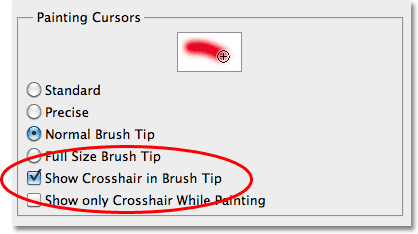
Sometimes you're conveying additional information through the cursor. For example, the default cursor in Photoshop when using the brush tools is a circle that shows your brush width, so that when using the brushes you know which area will be painted (see http://pe-images.s3.amazonaws.com/basics/cs5/preferences/sho... for example). Some other CAD applications show whether a line is freestanding or snapped to another through the cursor as well.
If you’re developing a UI with interesting interactions, you can provide useful and intuitive feedback to the user by changing the cursor, either to reflect what will happen if they click at the current location, or to show that for some reason they can not do something by clicking at the current location.
Exactly what actions are possible or potentially expected but actually not possible will naturally depend on context, including the purpose of the application itself, anything already done by the user, and perhaps other factors like whether the user is holding any keys down at the moment. There are endless possibilities where this idea could be useful, from “fill the intermediate cells using rule X” in a spreadsheet to “guard this ally” in a game.
As an aside, UIs that use this technique may also use larger or more complicated tool tips and/or context menus, which means that a lot of the local status and commands within a UI can be viewed in the immediate vicinity of where they are relevant. On larger screens or UIs that divide the available space into different areas for different purposes, that locality can be useful both for reducing user errors and for increasing efficiency.