So what's the trick to using APL if you don't have the keyboard? Do most people use the custom keyboard? What about with laptops? Is there some sort of mnemonic for what symbols correspond to what letters? Do people put stickers over their keycaps?
EDIT: Guys I mean literally the keyboard. Once it's software it's easy. I wanna know the best way to remember what key maps to what character.
> So what's the trick to using APL if you don't have the keyboard?
Snarky answer is to use J.
I have this hope that on-screen tablet keyboards will bring APL back. It's one of the few languages where you can actually be productive developing on a tablet or phablet because it requires so little typing. As well the idea of workspaces is something that would work well on modern phone OSes. Basically the same things that made APL a great choice for early personal computers (MCM/70 and IBM 5100 were both APL machines: http://www.xnumber.com/xnumber/MCM_70_microcomputer.htmhttps://en.wikipedia.org/wiki/IBM_5100) would make it work on phones.
You need an editor with some basic APL awareness. There is an APL-mode for Emacs where pressing dot ('.') switches to the APL layout for the next character. It feels very natural to use. I've seen others use a modifier key (like the Super/Windows key) to enter APL characters, which if done as an xmodmap thing, would work in every program. (The programmer I saw do this prefered to do his APL programming in ed(1) - no joke). I assume the Dyalog APL IDE has something similar.
> I wanna know the best way to remember what key maps to what character.
When I started to learn typing on a keyboard, I had a keyboard layout printed out and taped it on the side of the CRT screen. I never looked down on my keyboard, which is a reason every time someone using a extra fancy backlit keyboard makes me cringe.
I did the same thing for Cyrillic layout, the same thing for Greek layout, the same thing for Japanese カナ, the same thing for Chinese 五笔,and the same for APL.
For me, the backlighting isn't so that you look at the keys while you're typing, it's so that you don't start typing with your fingers shifted to the side and have to back up.
it's so that you don't start typing with your fingers shifted to the side and have to back up.
That's what the "finger alignment ridges" on the F and J keys are for. They were there long before keyboards were backlighted. (Or are "modern" keyboards lacking those ridges now? I don't know, the newest keyboard I have is 12 years old.)
They're on my Microsoft Sculpt and the 8 year old Thinkpad in front of me, so I don't think they've disappeared. I guess I don't notice them when I start typing? I'll have to try and pay some attention to them.
if you have gnome or cinnamon (possibly xfce) enter
gsettings set org.gnome.libgnomekbd.desktop load-extra-items true
into a console then the APL mappings will show up in the inpute options, if you're in KDE it'll already be visible. Either way once you do that you can set it so holding some key (i use the win key) switches layouts.
You wouldn't happen to know why the two layouts, besides UK and US, are Danish and Finnish? As a Dane it's kinda cool, but hardly the first language you'd expect to see listed for something this niche.
APL has historically had relatively high market penetration in Scandinavia and Japan. Dyalog is a British company but for the last decade there has been significant Danish and Italian involvement in the form of major clients and the management team who engineered a "Management Buy In" together in 2005. Our headquarters and more than half the employees are in Basingstoke, UK. We have team members in Denmark (including the CEO and CXO), France, the USA and Canada. Since January, the CTO job is back in English hands.
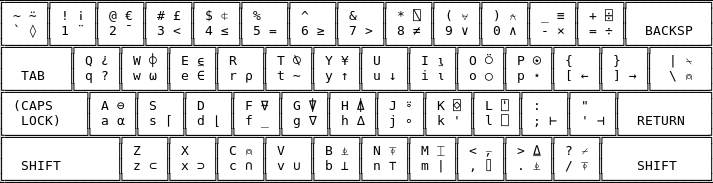
(some keys might be a little different; I had trouble finding a good source for APL Union keyboard). I develop on Linux, using a plain text editor, so I have an .xmodmap file that lets me press the keys in the picture above while holding a modifier (right alt) to input the appropriate unicode code points.
I am sure an IDE like what comes with dyalog will do this for you.
As far as learning the keyboard, it's not too hard; just keep a picture of the layout printed out for a day or two and you'll get it. There's some sort of pattern: for instance, the "ρ" (rho) character is on the R key, and "ι" (iota) is on the I key. It's like learning to type, except much faster because you've learned it once before.
I think the comment to use one of successor languages is most pragmatic. I learned with stickers on keyboard, you don't want to do that, and a dedicated keyboard sounds kind of silly (this from former pro IBM APL2 programmer, it was my 2nd language).
However, I don't really like the digraphs/glyphs/whatever that J uses that much, i think there's a mode where there's short forms like "rot" for rotate function, "ind" for index etc, look for those.
I use emacs and just press the dot button to access an additional layer on my keyboard with the special characters. The APL characters are surprisingly easy to learn and in my experience superior to the ASCII based ones used by J et al.
I think the closest thing I can compare them to, would be using musical or mathematical notation vs trying to describe the same things with text. Using notation has a slight learning curve, but is superior in day-to-day usage.


EDIT: Guys I mean literally the keyboard. Once it's software it's easy. I wanna know the best way to remember what key maps to what character.