Linux is UNIX in the context of my question. On Linux the shebang is actually handled by the kernel. When you load a binary and attempt to execute it with a syscall, the kernel reads the first few bytes of the binary. If it is an ELF header, it executes the machine code as you would expect. If the first two bytes are "#!", then it interprets it as a shebang header and loads the specified binary to interpret it.
Again, this is kernel code. I admit I'm a bit confused as to why it didn't work on your system. This shouldn't be handled at the shell level.
It is possible for the shell to handle it. From zshall(1):
> If the program is a file beginning with ‘#!', the remainder of the first line specifies an interpreter for the program. The shell will execute the specified interpreter on operating systems that do not handle this executable format in the kernel.
I did a little digging and found that the `|| eno == ENOENT` was added quite a bit earlier[1] than the actual pathprog lookup[2]. While I could find the "issue discussion" for the pathprog change[3] I wasn't able to find it for the ENOENT addition, which was kind of interesting and frustrating--[4] is the `X-Seq` mentioned in the commit but that seems to be inconsistent or incorrect for the actual cross-reference, and nearby in time wasn't helpful either.
I think it makes it to calling open_exec but there's a test for BINPRM_FLAGS_PATH_INACCESSIBLE, which doesn't seem relevant since 'bash' isn't like '/dev/fd/<fd>/..', but does provoke an ENOENT.
env bash is all well and good for normies, but if you're already on NixOS did you know you can have nix-shell be your interpreter and back flip into any reproducible interpreted environment you like?
Or any other system with Nix installed. I use this at work to provide scripts with all their dependencies specified that work across any Linux distro & MacOS. First execution is slow since it has to fetch everything, but after that it's fast and just works.
md takes multiple partitions to make a virtual device you can put a file system on, with striping and traditional RAID levels
unRaid takes multiple partitions, dedicates one or two of them to parity, and hands the other partitions through. You can handle those normally, putting different file systems on different partitions in the same array and treating them as completely separate file systems that happen to be protected by the same parity drives
This enables you to easily mix drives of different sizes (as long as the parity drives are at least as large as the largest data partition), add, remove or upgrade drives with relative ease, and means that every read operation only goes to one drive, and writes to that drive plus the parity drives. Depending on how you organize your files you can have drives that are basically never on, while in an md array every drive is used for basically every read or write.
The disadvantages are that you lose out on the performance advantages of a RAID, and that the raid only really protects against losing entire disks. You can't easily repair single blocks the way a zfs RAID could. Also you have a number of file systems you have to balance (which unRaid helps you with, but I don't know how much of that is in this module)
Not sure what you mean by 'easily repair single blocks the way a zfs RAID could', but often the physical devices handle bad blocks, and md has one safety layer on top of this - bad blocks tracking. No relocation in md though, AFAIK.
What I mean is that unraid, zfs and md all allow you to run a scrub over your raid to check for bit rot. That might happen for all kinds of issues, including cosmic rays just flipping bits on the drive platter. The issue is that unraid and md can't do much if they detect a block/stripe where the parity doesn't match the data (because it doesn't know which of the drives suffered a bit flip). Zfs on the other hand can repair the data in that scenario because it keeps checksums.
Now a fairly common scenario is to use unRaid with zfs as the file system for each partition, having Y independent zfs file systems. In that case in theory the information to repair blocks exists: a zfs scrub will tell you which blocks are bad, and you could repair those from parity. And a unraid parity check will do the same for the parity drives. But there is no system to repair single blocks. You either have to dig in and do it yourself or just resilver the whole disk
The silly part is unraid has all the pieces to do this. The btrfs file system which unraid supports for array disks could identify bitrot, and the unraid array supports virtualizing missing disks by essentially reconstructing the disk from parity and all of the other disks. Combining those two would allow rebuilding a rotted file with features already present.
My impression is unraid developers have kind of ignored enhancing the core feature of their product to much. They seem to have put a lot of effort into ZFS support which isn't that easy to integrate as it isn't part of the kernel, when ZFS isn't really the core draw of their product in the first place.
It's too metadata heavy, and is really shines on high IOPS SSDs, it's a no go for spinning drives, esp. if they're external.
RAID5/6 is not still production ready [0], and having a non production ready feature not gated behind a "I know what I'm doing" switch is dangerous. I believe BTRFS' customers are not small fish, but enterprises which protect their data in other ways.
So, I think unraid does the right thing by not doubling down on something half-baked. ZFS is battle tested at this point.
I'm personally building a small NAS for myself and researching the software stack to use. I can't trust BTRFS with my data, esp. in RAID5/6 form, which I'm planning to do.
Hit the comment depth limit (so annoying), but the comment about repairing blocks means that you can repair bitrot/corruption/malicious changes/whatever down to the block level of a ZFS dataset if you have a redundant replicated dataset.
The magic of ZFS repairs isn't in RAID itself, IMO, it's in being able to take your cold replicated dataset, e.g., from LTO, an external disk, remote server etc, and repair any issues without needing to resilver, stress the whole array, interrupt access, or hurt performance.
RAID can correct issues, yes, but ZFS as a filesystem can repair itself from redundant datasets. Likewise, you can mount the snapshots like Apple Time Machine and get back specific versions of individual files.
I wish HN didn't limit comment depth as these are great questions and this is heavily under-discussed, but it's arguably the best reason to run ZFS, IMO.
Another way of putting this—you don't need a RAID array, you can do individual ZFS disks and still replicate and repair them. There's no limits to how many replicas or mediums you use either. It's quite amazing for self-healing problems with your datasets.
The rate limiter is only applied to accounts that post too many comments that are of low-quality or break the guidelines. We're always open to turning off the rate limiter on an account but we need to see that the user has shown a sincere intent to use HN as intended over a reasonable period of time.
I've been using HN since 2018, and whilst I'm a bit rough around the edges, I generally interact with the best of intentions as long as my blood glucose is within range (which, with a CGM, is more than at any other point in my life).
I think it’s actually a flamewar detector that you may be hitting. In any case, next time try selecting the timestamp of the comment which you wish to reply to; this works when the reply button is missing and the comment isn’t [dead] or [flagged][dead] iirc.
I'm sorry, I still don't quite follow... If you have a RAID5, you can repair a drive failure... Weren't we talking about handling 'blocks'? Is it bad blocks or bad block devices (a.k.a. dead drives)?
Ignoring its biggest advantage vs mdraid, or zfs raid:
The ability to sleep all / individual HDDs:
* only keep awake the drives that your actually read data from
* only keep awake the drive that your write data too + n parity drives
For home users, that is a TON of energy saving. And no, your "poor" HDDs are not going to suffer from spinning up a few times per day.
You can spin up/down a HDD 10x per day, for 100 years before you come even close to the manufactures (lowest) hdd limits. Let alone if you have 4+ drives and have a bit of data spreading, or combined with unraids nvme/ssd caching layer.
So unlike mdraid or zfs where its a all or nothing situation, unraid / snapraid gives you a ton of energy saving.
And i understand the US folks here do not care when they pay maybe 6 to 12 cent / kwh, but the rest of the world has electricity prices in the 30 to 50 cent / kwh, and it stacks up very fast when you are using < 1watt vs 5/7Watt per HDD/24/7...
I have an unRAID homelab. It's kind of really awesome in the sense that it lets the home user incrementally add compute and capacity over time without having to do it all in one big shebang and doesn't require nearly the fussing over of my prior linux server.
I started mine with a spare NUC and some portable USB drives and its grown into a beast with over 100TB spread across a high performance SSD backed ZFS pool and an unRAID array, 24 cores, running about 20 containers and a few VMs without breaking a sweat and so far (knock on wood) zero data loss.
All at a couple hundred dollars every so often over the years.
One performance trick it supports is also letting you overlay fast SSD storage over the array, which is periodically moved onto the slower underlying disk. It's transparent, so when you write to the array you can easily get several hundred MB/sec which will automatically get moved onto warm storage periodically. I have two fast SSDs RAIDed there and easily saturate the network link when writing.
The server basically maintains itself, I only go in every so often and bump the docker containers at this point. But I also know that I can add another disk to it in a about 10 minutes and a couple hundred bucks.
> The server basically maintains itself, I only go in every so often and bump the docker containers at this point. But I also know that I can add another disk to it in a about 10 minutes and a couple hundred bucks.
Yes. UnRAID rightfully gets a lot of attention for its flexibility in upgrading with disks of any size (which feels like magic), but for me its current >100-day uptime while maintaining a UnRAID array, three VMs, and a few other services is just as important. The only maintenance I do is occasionally look at notifications, and every month (if that often) upgrade plugins/Docker containers with new versions.
I think that's mainly it. It does give you some peace of mind that you are never in an "unprotected until next snapshot" state. But if you don't care, then there isn't much else that I noticed.
> If a drive fails, you rebuild it from the parity.
But if the file system is corrupt then you're hosed and end up with a `lost+found`. It sounds great until it fails, and then you realize why ZFS with replication makes sense. Unraid doesn't do automatic repairs from replicated ZFS datasets yet either even if you use individual ZFS disks within your Unraid array.
I have an issue with this though... Won't you get a write on the parity drive for each write on any other drive? Doesn't seem well balanced... to be frank, looks like a good way to shoot yourself in the foot. Have a parity drive fail, then have another drive fail during the rebuild (a taxing process) and congrats -- your data is now eaten, but at least you saved a few hundred dollars by not buying drives of equal size...
> Have a parity drive fail, then have another drive fail during the rebuild (a taxing process) and congrats -- your data is now eaten
That's just your drive failure tolerance. It's the same risk/capacity trade as RAIDZ1, but with less performance and more flexibility on expanding. Which is exactly what I said.
If 1 drive failure isn't acceptable for you, you wouldn't use RAIDZ1 and wouldn't use 1 parity drive.
You can use 2 parity drives for RAIDZ2-like protection.
You can use 3 drives for RAIDZ3-like protection.
You can use 4 drives, 10 drives. Add and remove as many parity/capacity as you want. Can't do that with RAID/RAIDZ easily.
My issue is that due to uneven load balancing, the parity drive is going to fail more often than in a configuration with distributed parity, thus you are going to need to recalculate parity for the array more often, which is a risky and taxing operation for all drives in the array.
As hammyhavoc below noted, you can work around this by having cache, and 'by deferring the inevitable parity calculation until a later time (3:40 am server time, by default)'.
Which seems like a hell of a bodge -- both risky, and expensive -- now the unevenly balanced drive is the cache one, it is also not parity protected. So you need mirroring for it in case you don't want to lose your data, and the cache drives are still expected to fail before a drive in an evenly load-balanced array, so you're going to have to buy new ones?
Oh and btw you are still at risk of bit flips and garbage data due to cache not being checksum-protected.
> due to uneven load balancing, the parity drive is going to fail more often than in a configuration with distributed parity
Good, it can be the canary.
> thus you are going to need to recalculate parity for the array more often, which is a risky and taxing operation for all drives in the array
This is not worth worrying about.
First off, if the risk is linear then your increased parity failure is offset by decreased other-drive failure and I don't think you'll have more rebuilds.
And even if you do get more rebuilds, it's significantly less than one per year, and one extra full-drive read per year is a negligible amount of load. If you're worried about it all hitting at once then A) you should be scrubbing more often and B) throttle the rebuild.
You need to run frequent scrubs on the whole zfs array as well.
On unraid/snapraid you need to spin 2 drives up (one of then is always the parity)
On zfs, you are always spinnin up multiple drives too. Sure the "parity" isn't always the same drives or at least it's up to zfs to figure that out.
Nonetheless, this is all not really likely to have a significant impact. Spinning disks failure rates don't exactly correlate with their utilization[1][2]. Between SSD cache, ZFS scrubs, general usage, I don't think the parity drives are necessarily more at risk. This is anectodal, but when I ran an unRAID box for few years myself, I only had 1 failure and it was a non-parity drive.
The literature generally refers to utilization metrics by employing the term duty cycle which unfortunately has no consistent and precise definition, but can be roughly characterized as the fraction of time a drive is active out of the total powered-on time. What is widely reported in the literature is that higher duty cycles affect disk drives negatively
You want your drives to fail at different times! Which means you want your load to be unbalanced, from a reliability standpoint. If you put the same load on every drive (like in a traditional RAID5/6) then the drives are likely to fail at around the same time. Especially if you don't go out of your way to get drives from different manufacturing batches. But if you misbalance the amount of work the drives get they accumulate wear and tear at different rates and spend different amounts of time in idle, leading them to fail at wildly different times, giving you ample time to rebuild the raid.
I'd still recommend anyone to have two parity drives (which unraid does support)
I often see these discussions and "drive failure" is often mentioned and I wish the phrase was instead "unrecoverable read error" because that's the more accurate phrase. To me, "drive failure" conjures ideas of completely failed devices. An unrecoverable read error can and does happen on our bigger and bigger drives with regularity and will stop most raid rebuilds in their tracks.
"unrecoverable read error" or "defects" is probably a better framing because it highlights the need to run regular scrubs of your RAID. If you don't search for errors but just wait until the disk no longer powers on you might find out that by then you have more errors than your RAID configuration can recover from
The wear on the parity drive is the same regardless of raid technology you choose, unraid just lets you have mismatched data drives. In fact you could argue that unraid is healthier for the drives since a write doesn't trigger a write on all drives, just 2. The situation you described is true for any raid system.
No, because you have a cache pool and calculate the parity changes on a schedule, or when specific conditions are met, e.g., remaining available storage on the cache pool.
The cache pool is recommended to be mirrored for this reason (not many people see why I find this to be amusing).
And let me guess, the cache pool is suggested to be on an SSD?
> Increased perceived write speed: You will want a drive that is as fast as possible. For the fastest possible speed, you'll want an SSD
Great, now I have an SSD that is treated as a consummative and will die and need to be replaced. Oh and btw you are going to need two of them if you don't want to accidentally your data.
The alternative? Have the cache on a pair of spinning rust drives which will again be overloaded and are expected to fail earlier and need to be replaced while also having the benefit of being slow... But at least you won't have to go through a full rebuild after a cache drive failure.
Man, I am not sold on the cost savings of this approach at all... Let alone the complexity and moving parts that can fail...
> Great, now I have an SSD that is treated as a consummative and will die and need to be replaced.
It's only consumable if you hit the write limit. Hard drive arrays are usually not intended for tons of writes. SSDs $100 or less go up to at least 2000 terabytes written (WD Red SN700). How many hundreds of gigabytes of churn do you need per day?
Nobody has to rebuild after a cache drive failure. The data you would lose is the non moved data on the cache drive. You are really overthinking this with former knowledge that leads you to assumptions that are just not true.
Depends. If you use a cache like they recommend you’d only get parity writes when it runs its mover command. Definitely adds a lot of wear but so far i haven’t had any parity issues with two parity drives protecting 28 drives.
There are others but http://completionist.me/ works the best for me. Shows the averages and also has things like "this many games are under 5 percent completion" so I can go find something I booted up once and forgot about.
I also use steams category system to then tag some of those into a backlog category, although that doesn't help as much
  Location: Uppsala, Sweden
  Remote: Yes
  Willing to relocate: Yes
  Technologies: C/C++/C#, Linux stuff, various SCADA systems.
  Résumé/CV: https://miffe.org/cv.pdf
  Email: hn@miffe.org
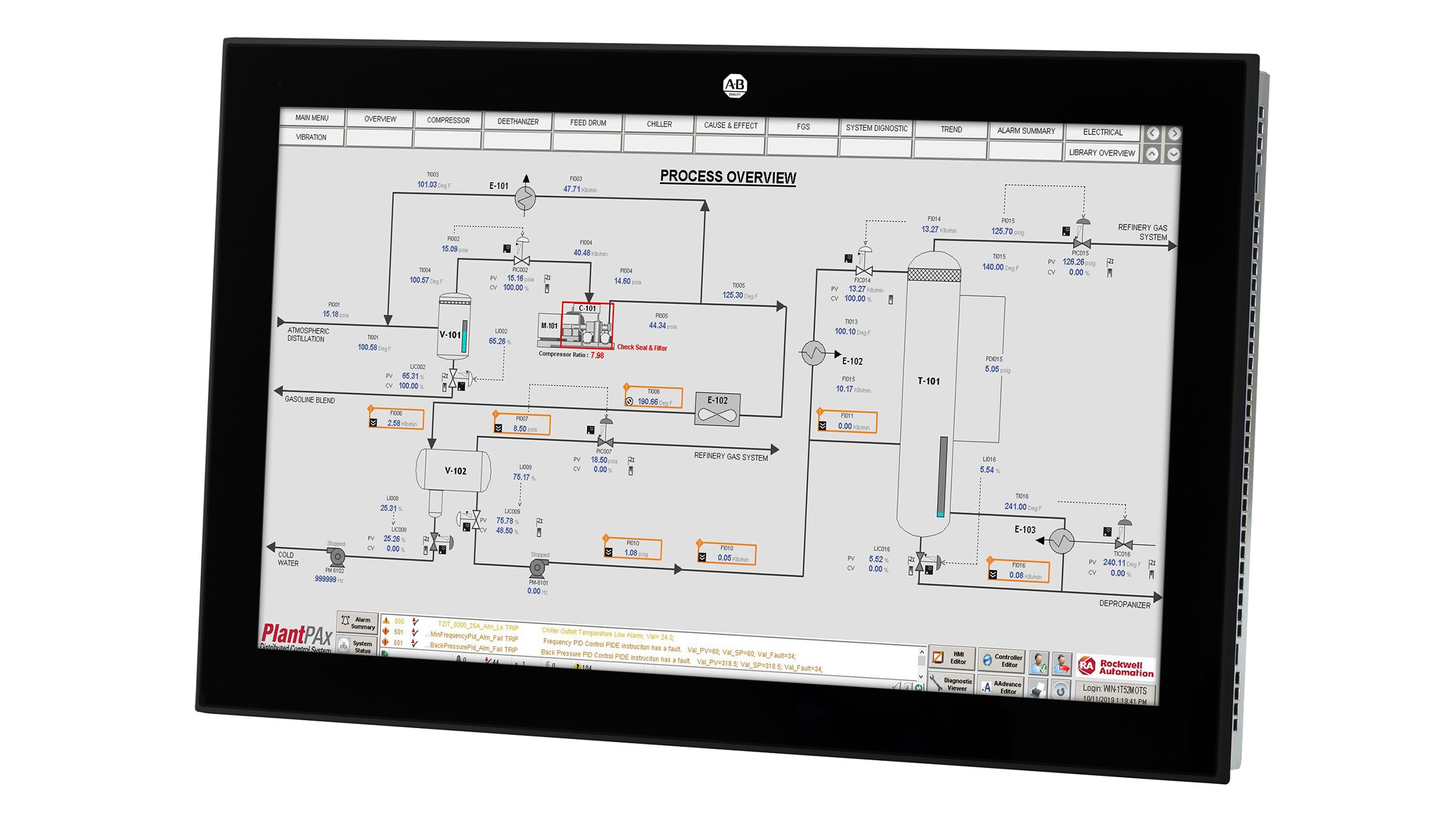
Not only is this showing details for every tank, valve, pump etc in the system, it's also highlighting those which have warnings or alarms against them, so the operator knows which values are nominal and which ones need action to be taken. Depending on the system, you may also be able to tap on each value to pop up a dialog which shows that value on a graph, lets you set alarm thresholds, or lets you switch a piece of equipment from automatic to manual control (from the operator station) or local control (from physical buttons on the equipment) or maintenance mode (safely locked out).
I'm not claiming that all of these SCADA/PLC HMIs are good, but they're really interesting examples of what a user interface can look like when information density and usability matters more than being pretty, and where you can require your end users to have training to use the system.
I swear this isn’t an “rtfm” dig, but in the case that this report of flickering is the first you’ve been made aware of it (and so you haven’t dug into it yet) I recently had to deal with this when experimenting with WebGL for the first time and found this thread to be full of information. https://stackoverflow.com/questions/19764018/controlling-fps...
A few of the suggestions “work”, but in the end I went with the accepted answer, only modified to use window.performance.now() rather than Date.now() from the accepted answer.
There are more suggestions that make sense but I haven’t tried that include using multiple threads, calling setInterval/setTimeout in a separate thread for CPU work from the rAF() call (which is GPU and should not update if there is nothing to update) but this wasn’t immediately helpful to me so I went with the elapsed time test and explicit frameRate. There are some potential sync issues over time but they are discussed in the SO thread and additionally on the mozilla developer site, where they also discuss syncing to an audio clock at 60 Hz.


reply